Automate your firewall with Rules
Most of what a firewall does stays the same all day. Some things, though, depend on where you are and what your connection is doing, and those are easier to leave to the app: keeping the internet blocked until the tunnel connects from the right country, pausing cloud sync on café Wi-Fi, or warning you when something starts using a lot of data. That’s what Rules are for.
A rule starts with an event, such as the tunnel connecting or dropping, a change of network or IP, a set time, or simply a check every few minutes. When it happens, the rule looks at its conditions, for example the country of your IP, the Wi-Fi you’re on or how much data you’ve used. If they hold, it does what you told it to, whether that’s blocking the internet, blocking an app, switching profile or showing a notice. You can also give it something to do when the conditions don’t hold, which is usually where you undo the first part and let blocked apps back online.
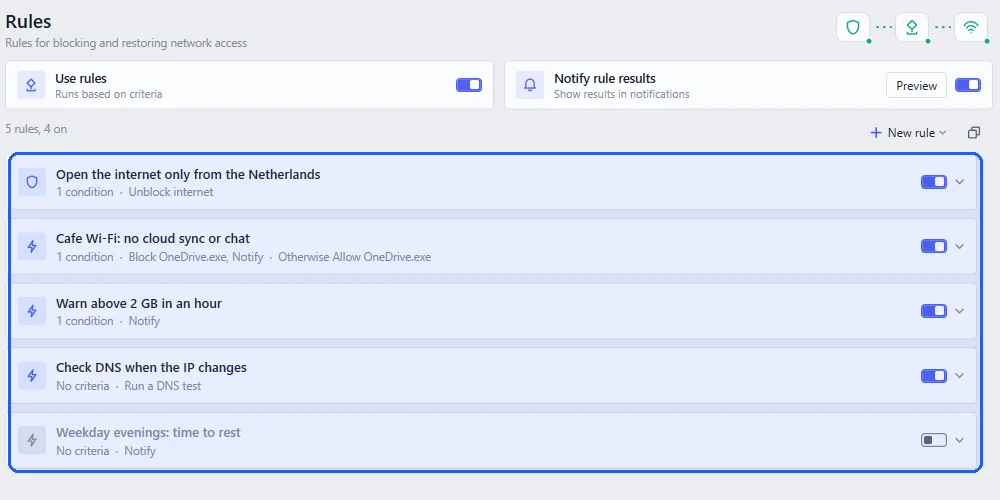
Rules only run while Use rules is on, and each rule has its own switch too, so you can keep one ready and turn it on when you need it. If you’d like to know every time a rule acts, turn on Notify rule results.
Good ones to start with
One of the most useful rules keeps the internet blocked until the tunnel’s exit IP is in a particular country, which matters for services that only work from one place. Internet only from one country walks through it. If you work from cafés, a rule can block sync and chat apps on public Wi-Fi and let them back on at home. A rule that runs every ten minutes can warn you when more than 2 GB went in the last hour, and one that runs a DNS test whenever your IP changes catches a leak as soon as it starts.
To build one from scratch, see building a rule, step by step. Rules are part of Pro.